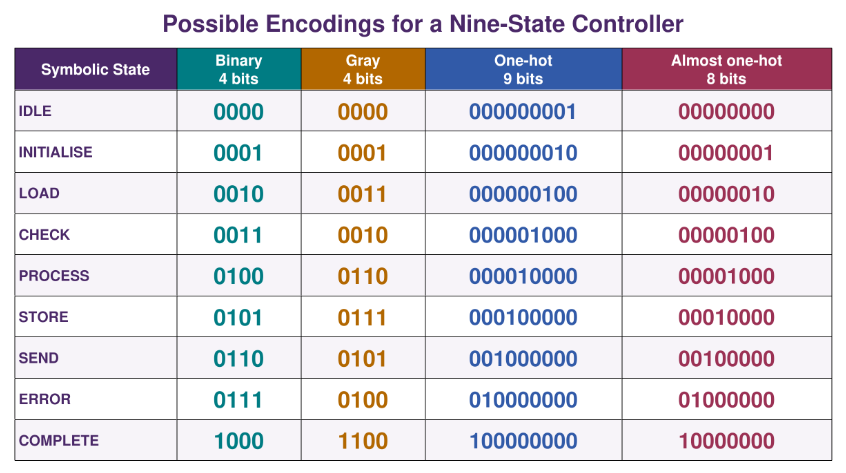
State assignment (also known as state encoding) is the mapping of each symbolic state name onto a binary code stored in flip-flops. The chosen encoding affects flip-flop count, combinational logic size, and maximum Clock speed.
| Encoding Scheme | Flip-flops for States | Key Notes |
|---|---|---|
| Binary | Fewest flip-flops; more combinational logic to decode. | |
| Gray | Adjacent codes differ by exactly one bit. | |
| One-hot | One flip-flop per state. HIGH when respective state is active. | |
| Almost one-hot | Same as one-hot, but all LOW represents a state, saving a flip-flop. | |
| Johnson | Adjacent codes differ by exactly one bit. Best for non-branching/cyclic paths; easier to decode than binary. |
Comment bq
One-hot encoding is useful for scenarios where flip-flops are cheap, such as when using FPGAs.
Unused State Codes
If the number of required states isn’t a power of two, then some binary codes stored in the flip-flops may not correspond to any defined state. These are known as unused or illegal states.
Concept bq
Even if number of states is a power of two, the synthesis tool may select an encoding that leaves some codes unused.
If the FSM enters an unused code, its subsequent behaviour may be unpredictable because the optimised next-state logic may not define transitions from that code.
Reset Recovery
Reset only sets the FSM’s initial state at start-up. It does not automatically pull the FSM back to a valid state if it strays into an illegal code mid-operation; dedicated safe-state logic is required.
Selecting the State Encoding in Quartus
Quartus normally auto-selects the state encoding method during synthesis. The directive syn_encoding can instead be used to request a particular encoding.
For example:
type state_type is (EVEN, ODD);
attribute syn_encoding : string;
attribute syn_encoding of state_type : TYPE IS "one-hot";
You can also provide the binary code for each state:
attribute syn_encoding of state_type : TYPE IS "00 01";Comment bq
To use our own state encoding, in Assignments > Settings, select Compiler Settings > Advanced Settings > State Machine Processing & change the value to User-Encoded
await dv.view("Scripts/topic-backlinks");