CITS2002 - Lecture 5
Structures - Slides
Recap: Defining Structures
Structures in C
-
In C, you must declare the ‘type’ before using a variable
e.g. int, Bool, char- This data type never changes
-
These basic “types” are known as primitive types
- They are the building blocks of data in C
-
typedeflets us create a new name for an existing primitive type- This is very useful when using structs!
Without typedef:
struct Student {
    char name[20];
    int number;
};

struct Student s1; // every time you declare, you must write "struct Student"
With typedef:
typedef struct {
    char name[20];
    int number;
} Student;   // "Student" is now a type name

Student s1; // looks just like a built-in typeOverview of Computer Hardware
- Studying operating systems requires some understanding of the components of a computer system
- There are four main structural components:
- CPU does calculations
- Memory stores instructions and data
- I/O Devices peripherals
- System Bus connects other components
Role of Operating Systems
- The role of the OS in managing the flow of data to and from its CPU and I/O devices, made very challenging by the wide variety of devices
- The OS attempts to attain maximum throughput of its computation and data transfer
CPU
- Executes Instructions:
- Instructions come from compiled programs (including OS)
- Fetches from memory and processes them
- Arithmetic Logic Unit (ALU) the CPU’s calculator
- Arithmetic unit: math operations
- Logic unit: comparisons, Boolean operations
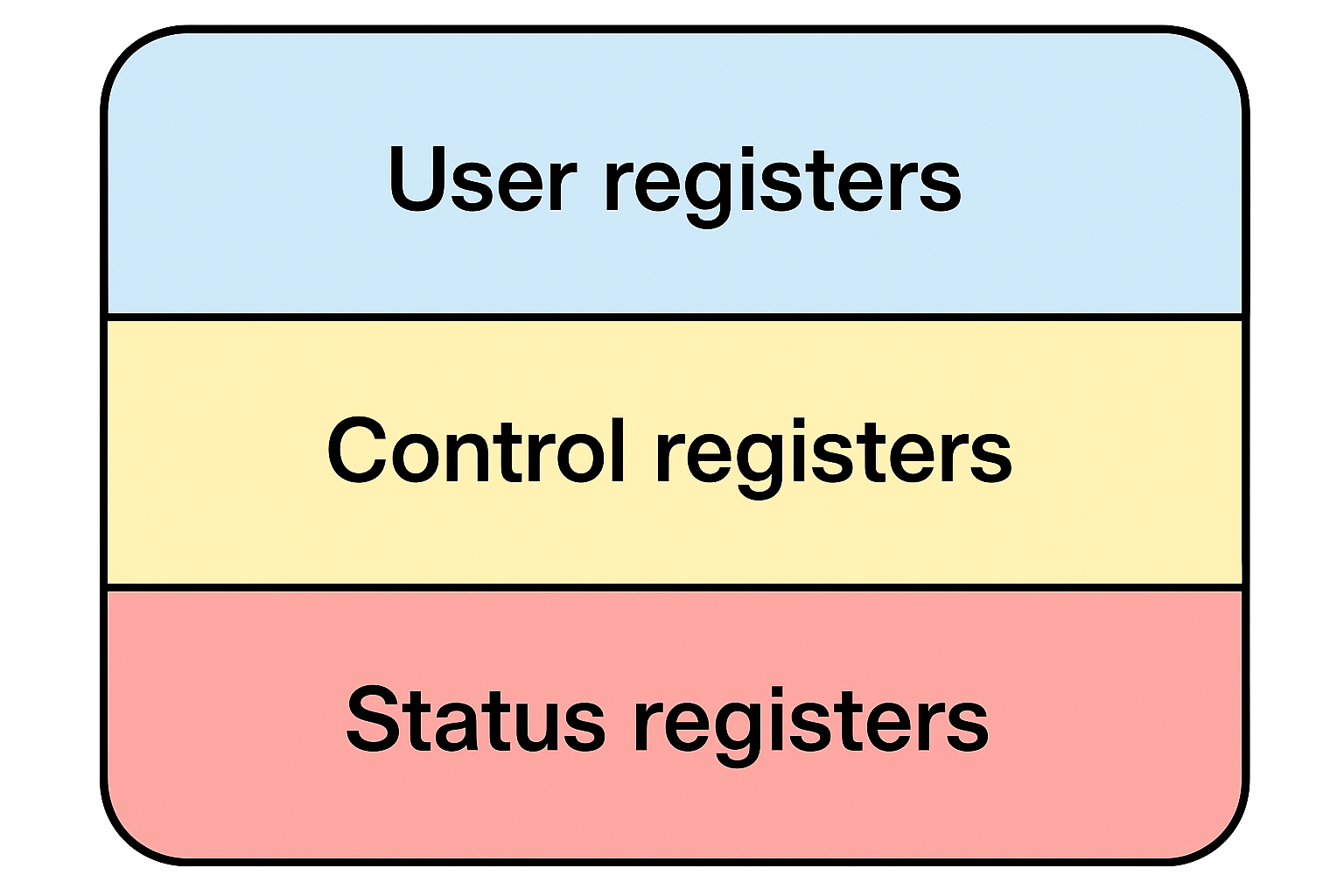
- Processor Registers very fast, small storage inside CPU
- User registers used by programs
- Data registers holds inputs and outputs
- Address registers holds addresses of memory locations
- System registers used by OS
- Control registers configure/control CPU or OS
- Status registers store information about CPU current state
- User registers used by programs
Interrupts
- Hardware or software signals that tell the CPU to pause the current task
- Important for efficient multitasking
Uses for interrupts:
- Timer interrupts — for time slicing in multiprogramming
- Device interrupts — when a device finishes a job
Execution safety:
- While instruction runs, interrupts are disabled so it finishes completely
- After it’s done, interrupts are enabled again
Memory
Types of Memory
- Main memory (RAM)
- Stores instructions and data
- Access is much slower than registers
- Secondary storage
- Hard disks, SSDs slower but more persistent
- Network storage can act as secondary storage
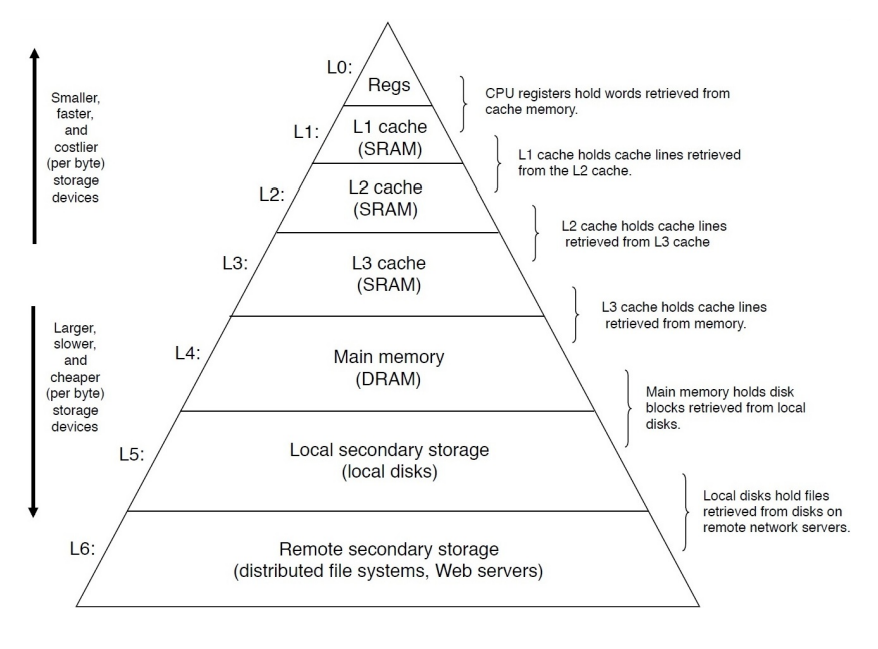
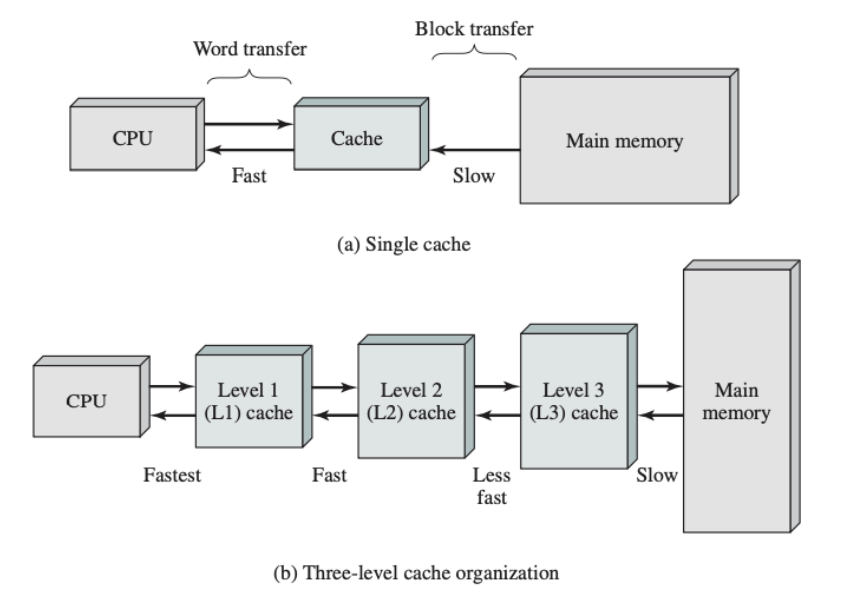
- Caches
- Smaller, faster memory between CPU and RAM
- Stores frequently accessed data to speed up processing
The Memory Hierarchy
- Having too much memory can be wasteful if it is not all required
- There is a trade-off between cost, capacity and access time
- Thus, we have a memory hierarchy
- We do not rely on a single form of memory
I/O Modules & Controllers
- I/O Module interface between CPU/memory and a device
- I/O Controller some devices have their own mini-CPU to handle tasks
- Direct Memory Access (DMA):
- Lets devices transfer large data chunks directly to RAM without making CPU do all the work
- Prevents CPU from “hanging” when lots of data is being moved
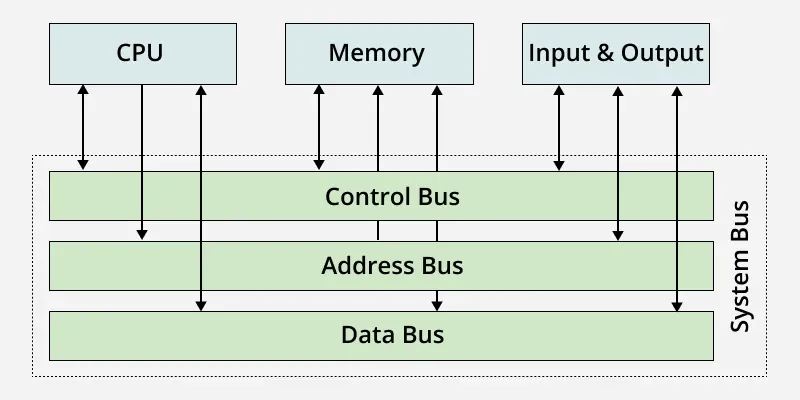
System Bus
- Transfers data, addresses, and control signals between components
- Also known as communications bus
- Connects CPU, memory and I/O devices together
- Structure:
- Data Bus — moves the actual binary values (data)
- Address Bus — specifies where to read/write data in memory
- Control Bus — signals for coordination (read/write, clock signals)
Tells devices what to do
- Bus Arbitration: Only one component can control the bus in a clock cycle, hardware decides who gets access
- Otherwise, signals would mix and corrupt
- This happens billions of times per second
Many programs are run “at once” by switching rapidly between them
CPU registers are essential for multiprogramming! The OS must remember where each process left off so it can resume correctly