Developing Larger C Programs in Multiple Files
Large C programs should be modularized into multiple source files:
- Each file performs a single role (e.g. input handling, calculations)
- Fewer global variables (scope is limited)
- Easier editing (multiple tabs or windows)
- Enables team collaboration (different people work on different files)
- Each file can be compiled separately → only changed files need recompilation
- Object files (
.o) are then linked together into a single executable
Providing Declarations in Header File
- ! We need a header file which makes some important declarations:
- C pre-processor constants and macros
- Globally visible functions (may be called from other files)
- Globally visible variables (may be accessed/modified from all files)
- The header file does not allocate memory or define code
- It uses
externkeyword to make declarations:
- It uses
#define MAXMARKS 200
extern int readmarks(FILE *); // parameters are not names
extern void correlation(int);
extern double projmarks[]; // array size is not provided
extern double exammarks[];
extern bool verbose; // declarations do not provide initialisations
Providing Variable Definitions
- ? We also need a global file to define global variables in
- In this file, the compiler will allocate memory for the variables defined in our header file
double projmarks[MAXMARKS]; // array's size is defined
double exammarks[MAXMARKS];
bool verbose = false; // global is initialised- @ By default, global variables are initialized with zero-byte patterns:
- 0 (for ints)
- ‘\0’ (for chars)
- 0.0 (for floats and doubles)
- false (for bools)
- zeroes (for pointers)
- Note: we could have omitted the initialisation of verbose to false, but providing an explicit initialisation is much clearer
The main() Function
- Our C files are now provided with the declarations of all global functions and global variables
- Our code may now call global functions, and access global variables, without declaring their existence
- Typically, we want to minimise global variable usage
Managing Multi-File Projects
- ! When a project has many source files:
- Hard to track which ones need recompiling after edits
- Rebuilding everything is inefficient
- We can use the program
make:makeautomates rebuilding only the out-of-date parts of a project- It reads a Makefile containing specifications and actions to take if indicated files are out-of-date (see below)
target : dependencies
	actions
- We will cover this a bit more later
Dependencies Between Files
- Some files depend on others, and if one changes, it can trigger the ‘rebuilding’ of others
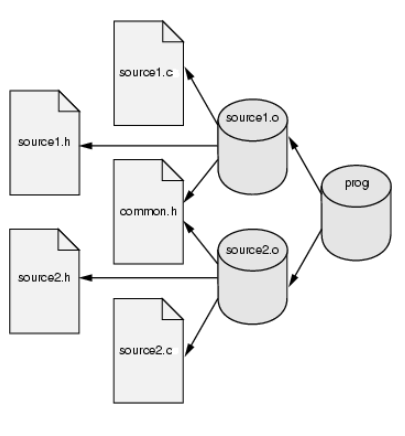
- Executable program → dependent on object files
- Object files → dependent on C source files + possibly header files
- C source files are not dependent on the header files
When a
.hor.cchanges → relevant.omust be rebuilt → then the executable is relinked
Makefiles
Thus knowing about dependencies, we can create an example makefile:
calcmarks : calcmarks.o globals.o readmarks.o correlation.o
	cc -std=c11 -Wall -Werror -o calcmarks \
	calcmarks.o globals.o readmarks.o correlation.o -lm

calcmarks.o : calcmarks.c calcmarks.h
	cc -std=c11 -Wall -Werror -c calcmarks.c
Notes:
- Each command must start with a tab
- Long lines can be continued with
\ -lmlinks the math library (sqrt()used in correlation)
We can simplify Makefiles with variables (similar to #define in C):
C11 = cc -std=c11
CFLAGS = -Wall -Werror
calcmarks : calcmarks.o globals.o readmarks.o correlation.o
	$(C11) $(CFLAGS) -o calcmarks calcmarks.o globals.o \
	readmarks.o correlation.o -lm
- Define your variables at the top of the Makefile
- Variables are expanded in-line with $(VARNAME)
make also supports automatic variables which are kept up-to-date as its execution process:
$@→ current target$<→ first dependency (first item listed after colon)$?→ all dependencies newer than the target