What is Memory Management
- OS job: allocate memory fairly & efficiently among processes
- Process job: access its memory & request more when needed
- Goal: keep as many processes ready to run as possible
- If memory isn’t available → process is blocked
Requirements of Memory Management
- Logical organisation:
- Programs are written in modules, compiled independently
- They need to be linked together at runtime → termed late binding
- Physical organisation:
- Memory = fast RAM + slow disk
- OS handles movement between them
- Sharing:
- Processes can share read-only code
- Some cooperating processes can share writable memory for communication
- Relocation:
- In a multi-programming system, the execution of a single process is often unrelated to others
- When swapped out/in, processes may not go back to the same location
- Need a way to translate between process addresses and real memory
- Protection:
- Each process must stay inside its allocated memory
- Enforced by hardware, not software (too slow otherwise)
- Illegal access → generates exception/trap for OS to handle
Memory Allocation Using Partitioning
- Consider main memory being in either style of fixed-sized partitions:
- Equal sized partitions
- Unequal sized partitions
Fixed-Sized Partitioning
-
Any process whose size is less than or equal to a partition’s size may be loaded into that partition
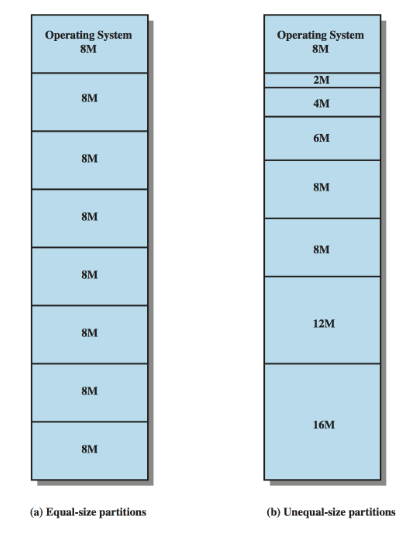
We end up encountering flaws with both styles:
- Equal sized partitions simple but:
- A process’s requirements may exceed the partition size
- A small process still occupies a full partition
- Known as internal memory fragmentation
- Unequal sized partitions flexible but complex placement algorithm:
- A process is placed in the largest partition, to minimise internal memory fragmentation
- A process is placed in the smallest available partition
Dynamic Partitioning
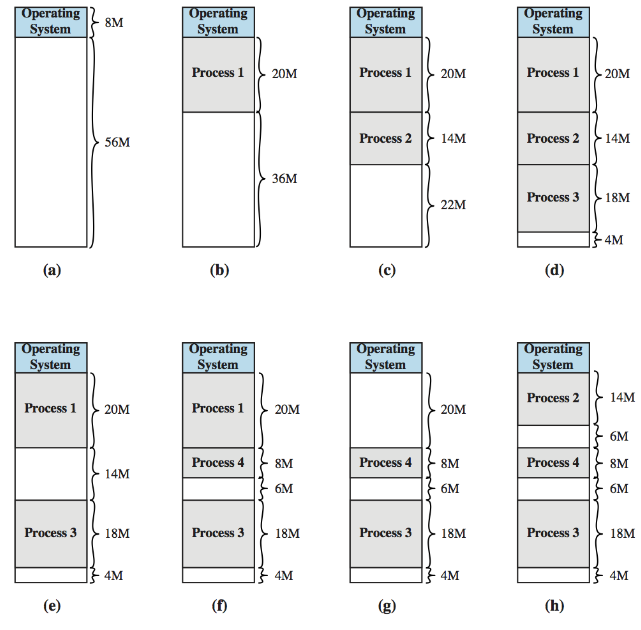
Dynamic partitioning overcomes some shortcomings of fixed partitioning
- Each process gets exactly the memory it needs
- However, over time free spaces split into small scattered chunks
- Known as external fragmentation
In figure above, dynamic partitioning introduces external memory fragmentation: insufficient contiguous free memory to hold a new process, even though sufficient free memory exists in the system
Dynamic Partitioning Placement Algorithms
When finding space for a process in dynamic partitioning:
- First-fit first free block that’s big enough
- Best-fit smallest free block that’s big enough
- Minimises wasted space, but can fragment
- Next-fit like first-fit, but search from where the last allocation ended
Address Relocation
- When a process is swapped-out, it will be swapped back in, with access to the same memory locations as before
- This assumption actually complicates the memory management task, and contributes to memory fragmentation
Address types:
-
Logical address: what the program uses
- Independent of actual memory
-
Relative address: logical address relative to program’s start
-
Physical address: real location in RAM
-
~ We’ve previously (implicitly) assumed that when a process is initially loaded (from disk), its relative addresses are replaced by absolute addresses
-
~ More realistically, we enable processes to be swapped-in to any feasible range of physical memory: and this location is unlikely to be the same as before
TLDR Problem: processes can be swapped into different physical places
Hardware Address Translation
- Solution: use hardware to translate logical → physical addresses
- Each process has:
- Base register (start of its memory)
- Bounds register (limit of its memory)
- When process is swapped out/in, OS updates these registers
Simple Memory Paging
- We want to reduce internal and external fragmentation
- Internal fragmentation (from fixed-partitioning) is bounded by the maximum size of the partition
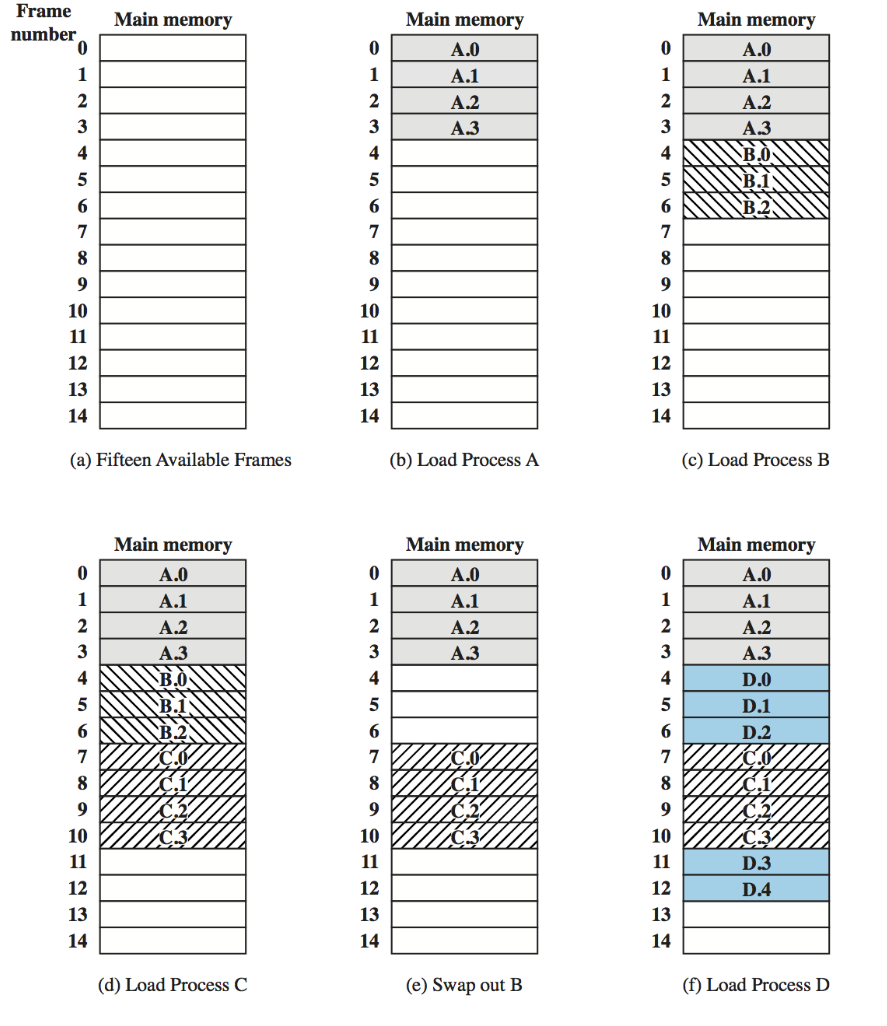
- Divide memory into small, fixed blocks → limit internal fragmentation
- Pages (in process’s view)
- Frames (in physical memory)
- A process’s pages don’t need to be contiguous
→ no external fragmentation - Only last page may have some wasted space
Page Tables
- OS keeps a page table for each process.
- Logical address =
(page number, offset)- Number of frames =
- Frame size =
- Hardware translates it:
- Look up the page number in the page table → get frame number
- Combine with offset → physical address
This allows:
- Easy relocation (just change page table)
- Protection (invalid access detected)
- Sharing (two processes can map a page to the same frame)